Pages

Search This Blog

Showing posts with label oracle ebs 11i setup. Show all posts

Sunday, April 25, 2010

Oracle EBS 11i setup -Oracle Payables setup

PAYABLE SETUP

Pre-requisites,
--COA is defined
--Set of Books defined
--Legal entity, Operating unit, Inventory Orgs defined
--Payable setup responsibility defined with all the required profiles assigned

1. Setup Financial Options-


2. Setup Payable options-


3. Define Payment terms-


4. Disbursement Bank setup-

a> Setup Payment programs (optional)


b> Setup Payment format (Optional),
If you have custom/specific bank payment format then define payment formats,


c> Setup Disbursement bank (Required),
You must setup your disbursement bank (internal bank) through which you are going to pay your suppliers,


This concludes your Oracle payable setup. You are ready to create Invoices and pay your suppliers.

Oracle EBS 11i setup -Oracle purchasing setup

Purchasing Setup

Assuming your employees are setup in Oracle with valid assignments.

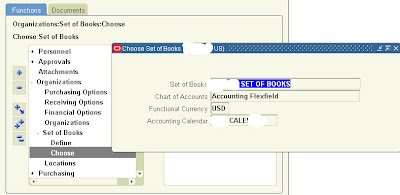
Step 1 - Choose Setup of Books (This is the most important setup and can not be undo once setup. So, pay special attention while doing this setup)

Choose the Correct Setup of Book name. Once setup, this can not be changed. So, be very careful while choosing the set of book name.


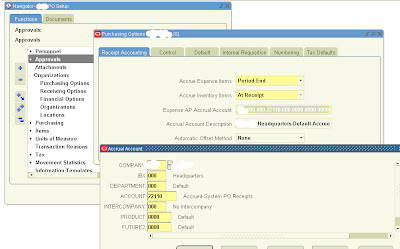
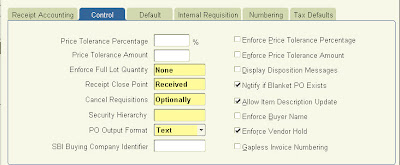
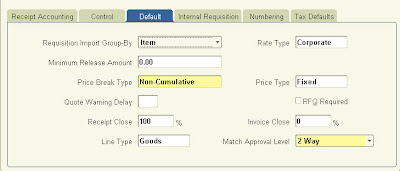
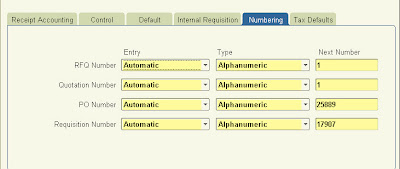
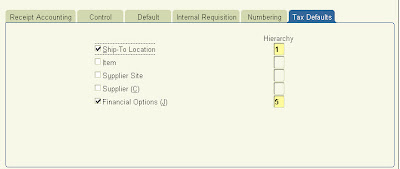
Step 2 - Setup Purchasing Options

Receipt Accounting (Key fields)-
Accrue Expense Items ("Period End")
AP Expense Accrual account -Liability account type
Accrue inventory items (Here it has been set up as "At Receipt")


Step 2 - Setup Purchasing Document Types

For more details on each field, you can go to the help screen of this page.
Security level - This option gives you control to set at which level you want this document to be accessible.


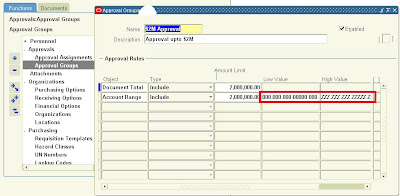
Step 3 - Setup Purchasing Approval Groups
Define the approval groups for your documents.
Document total -Enter the $ limit for this approval group.
Account range -Enter the same $limit and complete account range starting from 000 to ZZZ for all segments.


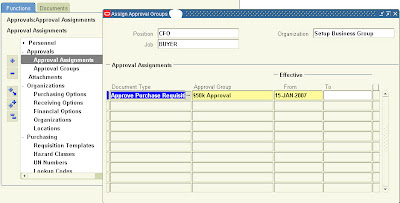
Step 4 - Assign PO Approval Groups to Job or Position depending upon setup in Purchasing options

Assign the approval groups defined in step 3 to Jobs / Positions (depending on the Purchasing options/ Human resources setup).


Step 5 - Setup Buyers
Setup new Buyers.
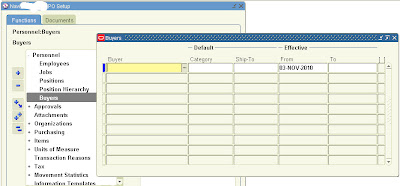


Step 6 - Setup Inventory items or/and Purchasing categories
Setup Purchasing Categories/Inventory items (if you have Inventory setup, optional) to be used while creating POs.


Step 7 - Define Default accounts for Purchasing categories (Optional)
This is an optional setup. If setup then when a purchasing category is chosen while creating the PO, the charge or expense account automatically gets defaulted to the PO at PO distribution level. Work with your business users to get the default accounts for each category to set this up.
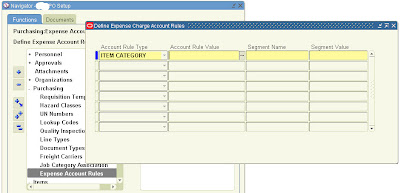


Step 8 - Define any custom PO Line types (Optional)


That concludes Purchasing setup. You can now create POs.

Oracle EBS 11i setup -Set of Books setup

In this post we will see how to setup a new Set of books in Oracle. We will set of a new set of books for a company called IPL for it's India operations.

Pre-requisite for setting up Set of Books in Oracle is,
1. Chart of Accounts (COA) setup
Check out the earlier video on COA setup video. I have considered a 5 segment chart of accounts as part of our DEMO setups for a company called IPL.

2. Calender

3. Currency

This is the well known 3C (chart of accounts, calender, currency) for SOB setup in Oracle. Once the above pre-requisites are setup, set of book can be defined.

Some other key elements for setting up of SOB apart from the above are,

a. Retained earnings account: This is the share holders / equity account. Oracle GL make necessary updates to this account whenever you do transactions in expense / income account through journals / subledgers etc. The account type for this account should be "Ownership/Stockholder's Equity"

b. Translation Adjustment account: This is the account used by Oracle GL for any difference happen (like difference due to rounding) while you translate your account level transactions from functional Currency to any other currency to make your journal balanced at account level in your translated currency. Again the account type for hti saccount is "Ownership/Stockholder's Equity"

Check out the following video for setting up Calender, currency and set of books,

Oracle EBS 11i Setup -Chart of Accounts Setup

Chart of Accounts setup in Oracle financials is the most important setup. Thorough analysis, consideration must be done before finalizing the chart of accounts of any organization with inputs from finance department such as reporting requirement, level at which transaction details are required etc.

Following video shows how to setup Chart of Accounts in Oracle EBS 11i,

Followers

Contributors